
1. Select the item option
Open the seller listing and confirm the exact size, colour and quantity. Save these details before placing the order.
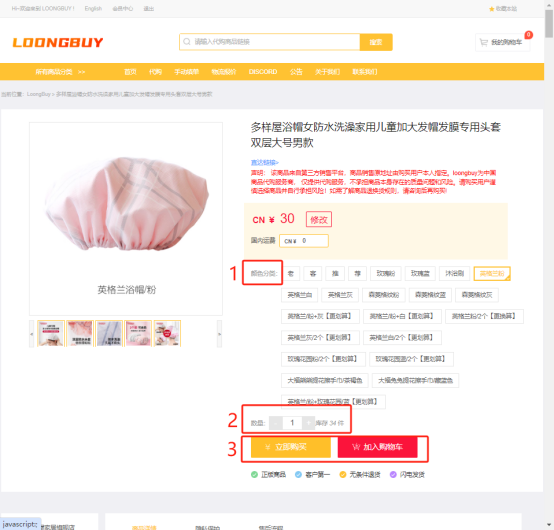
The agent buys from the link you provide. Everything true about the item that is not in the link has to be written somewhere, or it is not part of the order.
Type what you are after in English. What comes back is product cards, each pointing at one listing.
The handover
The right-hand column is not implied by anything. It exists only if you write it into the order message, and the message is the only free-text field a person reads.
What the card says
The listing address.
The seller, because the address belongs to one.
The price at that moment.
The variant, if you selected it before copying.
What the listing says now
Which size you actually meant.
That the pair has to match.
How much of a flaw you would accept.
Why you wanted this one rather than the near match.
In the operator's words
The home page describes the first step in two sentences, and they are worth reading closely because everything about ordering follows from them.
Paste the product link into LoongBuy and complete the payment. We will purchase the product from the seller based on the link you provided.
the operator's home page, captured 2026-10-10
Two things are being said. The purchase is from the seller, not from the agent, which is why the seller's policy governs what can be undone. And it is based on the link you provided, which is why the selected variant must be confirmed on the order form rather than assumed from a copied link.
The chain
The operator sets out the usual order of events: find a product link, submit a purchasing order, pay for the product, wait for the seller to ship to the warehouse, warehouse inspection and storage, submit an international parcel, pay the international shipping, wait for delivery.
Paying funds the order; the important cancellation boundary is whether the agent has purchased from the seller. An unpurchased order can usually be cancelled under the published rules. After purchase, the agent must ask the seller, and the seller's policy applies.
The message field
Written in the order they matter rather than the order the form presents them.
The most useful sentence in the whole order. Without it, a sold-out variant is an invitation for someone to choose for you. Ask support to confirm that condition before the purchase; cancellation and refund availability depend on the order status and seller policy.
Copy the seller's own colour name rather than describing it. A translated colour name and the seller's own are frequently different words for different things.
It is read by a person handling many orders. Two short lines get followed; a paragraph of conditions gets skimmed.
Detailed photographs, size measurement and video are offered as paid extras, and they can be added after the standard inspection photographs have gone up. If the thing you are unsure about is measurable, this is where it gets settled. What inspection covers.
Questions
Usually twice: once for the product and once for the international parcel. Value-added services, insurance or a shipping difference can add to that. The 10 October 2026 FAQ capture described a zero purchasing-service-fee mode, which help covers with the date attached.
Before the agent buys, an unpurchased order can usually be cancelled. After, it is a question for the seller. The re-check list is about staying on the near side of that line.
That is an after-sales case: submit the request within the required time with the evidence. The inspection photographs taken at check-in are dated and came from a third party, which is what makes them worth keeping.
Not at this stage. The line is chosen later, when you submit the parcel, and the estimator on the operator's site will quote against a weight and a destination before you commit.
Official tutorial examples from May 2026. Use your current account record for prices, available options and deadlines.
Open the seller listing and confirm the exact size, colour and quantity. Save these details before placing the order.
Check the item, domestic delivery and remarks in the order summary. International shipping is a later payment.
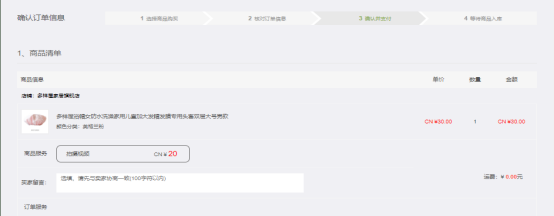
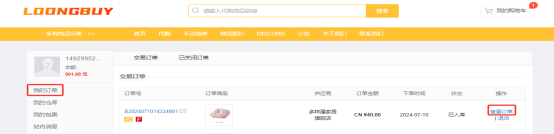
When the item reaches the warehouse, open the stored record and compare the available photos with the option you ordered. Resolve any concerns before requesting shipping.
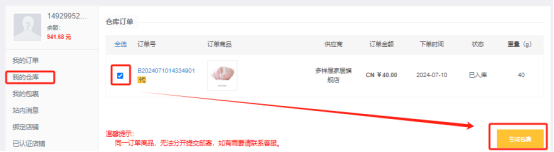
Select the stored items you want to ship. Confirm the address, packing, eligible route and current shipping quote before paying.
In the first tutorial frame, the product link leads to a page with many choices. Copying the address does not show which choice you intend. Before payment, read back the selected option text and quantity, then compare the item and domestic shipping lines with your saved listing.
A useful instruction might say: “Choose the pink checked option, one piece. Please ask before substituting another pattern.” That is a constructed example of a complete request, not a product recommendation. Keep the original option screenshot so that a translation or a changing gallery does not erase the reference.
If a price or domestic-freight difference is reported, inspect the account notice and its explanation before authorising payment. The later warehouse-information and parcel steps in the tutorial are separate decisions; they do not mean that the first payment has covered the complete journey.
The video linked by the official LoongBuy homepage introduces the buying process. Treat any example prices or interface labels as illustrative and follow your current account controls.
Watch the LoongBuy tutorial video →